
skip to main content
Link to Homepage John Lewis Partnership Supplier Portal John Lewis Partnership Supplier Portal
  • Coupa Support
  • Supplier Finance Queries
  • Working with John Lewis
    • Business Models
    • John Lewis Product Launch Operations
    • RFID
  • Policies
  • Coupa Support
  • Supplier Finance Queries
  • Working with John Lewis
    • Business Models
    • John Lewis Product Launch Operations
    • RFID
  • Policies
Open Device Menu Close Device Menu
Main Content
Smartsheets & Imagery PO Smartsheet Mandatory Attributes Enrichment Smartsheet Mandatory Attributes Legislation SOR & Direct to Customer Additional Information Mirakl - Commission Product Launch Code of Practices SOR Supplier Guide
  • Smartsheets & Imagery
  • PO Smartsheet Mandatory Attributes
  • Enrichment Smartsheet Mandatory Attributes
  • Legislation
  • SOR & Direct to Customer
  • Additional Information
  • Mirakl - Commission
  • Product Launch Code of Practices
  • SOR Supplier Guide
  • Link to Home page
  • Link to Working with John Lewis page
  • Link to John Lewis Product Launch Operations page
  • Link to Mirakl - Commission page
  • Link to Creating a Template for Catalog Data Upload

Creating a Template for Catalog Data Upload

Step 1.

Left hand menu.

Catalog > Catalog Management

Step 2.

Click Import Products
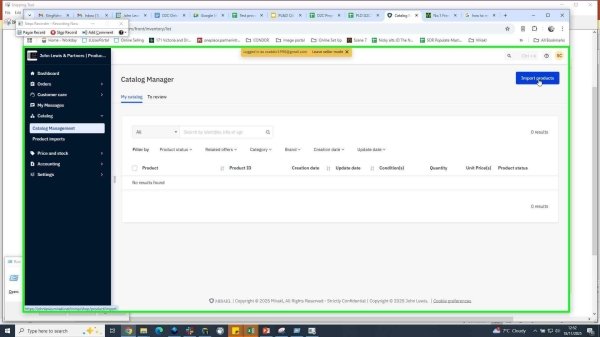
Step 2

Step 3.

Click Templates and documents
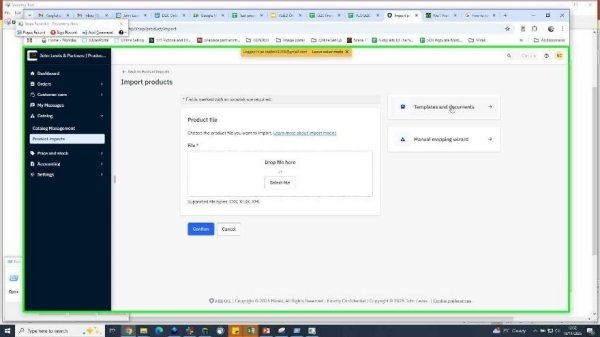
Step 3

Then, in the side bar, Generate product template
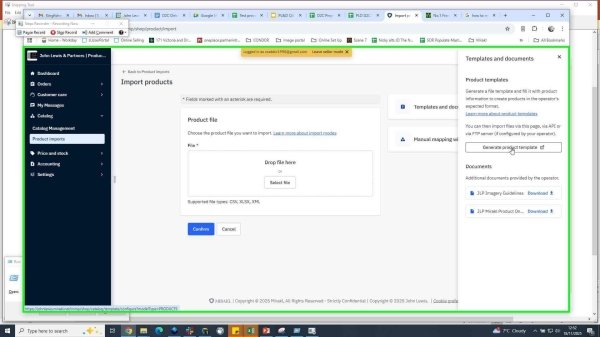
Step 3

Step 4.

Category (product type) Hierarchy
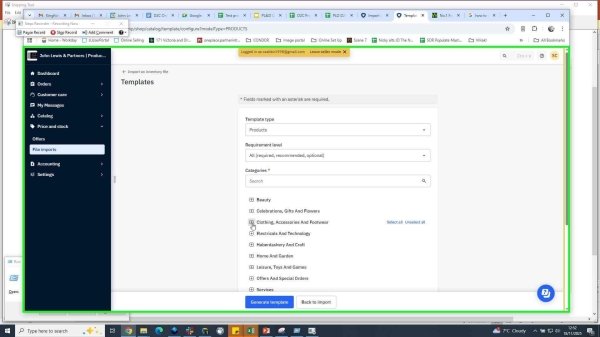
Step 4

Choose the product types you require

Copyright © John Lewis Partnership
  • Sitemap
  • Privacy Policy
  • Cookie Settings
  • Website Cookies