
Mirakl Statuses & Rejection Reasons
Product statuses are tracked in the Catalog Manager using three types: Validation, Acceptance, and Synchronization.
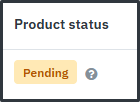
In your main Catalog Manager view, you can see the overall status of a product:
Clicking into a product will give you more detailed status information:
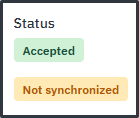
Validation Status
- The initial validation check is done by Mirakl as soon as your products are uploaded. This is based on the mandatory product data.
- Possible values:
- Pending: Your product data is New, Valid and will now be reviewed by us.
- Invalid data: Your product data is not compliant and your data will not be reviewed. Examples include missing product name or main image file type not valid.
Acceptance Status
- Indicates if your product has been approved or requires changes.
- Possible values:
- Pending: Your product is awaiting review.
- Changes Required: After review, your product has been rejected and requires updates due to quality issues. Examples of rejection reasons include:
Rejection Reasons Table
| Rejection Reason | What does it mean? | Example Rejection Comment | How to fix |
|---|---|---|---|
| Issue with quality of image(s) | Your images do not follow the JL guidelines | The main image must be a cut out of the product, clearly identifiable, on a plain background featuring no props | Reupload correct imagery |
| There is an issue with data quality | Your product data is either missing recommended attributes or has incorrect values | Please provide Material Type | Reupload your product template with the required data |
| Inconsistent value in variant group | Some attributes within a variation must be the same for all items within the Variant Group | Your product composition is not consistent across all items within the Variant Group | Reupload correct product composition data |
| Inconsistent size in variant group | The sizes within a Variant Group are not consistent with each other | The sizes selected must be of the same type for all SKUs within a Variant Group | Reupload your products with correct sizes |
| Inconsistent values in colour group | Some attributes within a colour group are not consistent | Your Supplier Colour names ‘Forest Green’ and ‘Emerald Green’ share the same Standard Colour ‘Green Mid’ | Reupload with unique Standard Colour names per Supplier Colour name |
| Multiple inconsistencies for attributes | Your data contains multiple errors | Your product composition is not consistent across all items within the Variant Group. Your Supplier Colour names ‘Ocean Blue’ and ‘Navy Blue’ share the same Standard Colour ‘Blue Mid’ | Reupload with correct data |
| Product category not agreed with JLP buying team | You are not permitted to upload products under that category | Product category not agreed with JLP buying team | Contact the buying team regarding permitted categories |
| Incorrect category used | You have used the incorrect category for your products | Please reupload under Women’s Sandals | Reupload using the correct category and product template |
| Existing wholesale products | Your products already exist on our system under wholesale. EANs cannot be published multiple times | Your products already exist on our system under wholesale therefore cannot be accepted through D2C | Contact the buying team regarding wholesale lines |
| Inconsistent Standard Colour per Supplier Colour | Your Supplier Colour must be matched consistently with the Standard Colour within a Variant Group | Please ensure all products with Supplier Colour: Burgundy have the same Standard Colour | Reupload your data with consistent Standard Colours |
| Product temporarily suspended from sale | Your products have been suspended from sale | Your products have been suspended from sale | Contact the buying team for more information |
| John Lewis account currently not set up | Your account is not fully set-up therefore we cannot accept your products yet | Your products will be accepted once JL contract is confirmed | Complete any outstanding account set-up tasks. If all complete, no action is required. |
Synchronisation Status
- Shows if the accepted product has successfully integrated into our systems
- Possible values:
- Pending: We have accepted your product and it is synchronising with our systems.
- Published: Your accepted product has synchronised with our systems and will begin the online set-up process.
Please note - ‘Published’ does not directly mean your product is live on the website.